
Wallace County Traffic Court Records
The 15th Judicial District traffic page explains who writes tickets. Sheriff's departments and the Kansas Highway Patrol issue them. Each one gets filed where the violation occurred. Your citation names the court and gives its address and phone number. That location rule matters most near a county or city line. A ticket written a mile away can belong to a different docket. Living in the county does not make a case a Wallace County case.
The Clerk of the District Court keeps Wallace County District Court records. A city ordinance citation, though, may begin in municipal court. District Court does hear municipal appeals. That does not mean every city citation starts there. Neither Sharon Springs nor Wallace offers an official municipal docket portal. Read the ticket and confirm the court it names.
Wallace County Tickets Follow Location
Where did the violation occur? That is the first question worth asking. The badge on the issuing officer's uniform does not settle which clerk holds the case. The court block on the ticket does. A ticket naming Wallace County District Court goes through the county court and state portal routes. One naming a city court needs a call to that city, through an official source, before you use any county payment channel.
- Citation
- The charging document issued for the alleged violation.
- Due date
- The date by which the ticket instructions require action.
- Setting
- A scheduled court event, not necessarily a trial.
- Disposition
- The recorded outcome after the court resolves the matter.
Remember that a payment search is not a full docket. It can help you find a payable violation, yet it may leave out filings, events, and orders sitting in the court record.
Looking Up a Traffic Ticket
Use every channel available to you. The Central Payment Center supports several search modes, and the public court portal may display eligible case information. The District Court clerk answers filing and appearance questions. Call 785-995-4289. The counter sits at 313 Main Street in Sharon Springs. For a public copy that is not online, a written clerk request is the route.
- Read the court name and due date printed on the ticket.
- Use the citation or case number in the official payment lookup.
- If needed, try an available name, license, or plate search route.
- Check the Kansas public portal for eligible district-court case information.
- Call or visit the named court if no result appears or the date is unclear.
- Record the confirmed date, response instructions, and case status.
Never sit on an online search past the printed due date. A citation may not be indexed yet, may belong to another county, or may be a municipal matter.
Wallace County Traffic Payment Fields
The official district page links to the KSCourts Central Payment Center. Its blank search form takes more than one identifier. Use only your own case data, and skip private numbers on a shared device.
| Search Mode | Additional Field |
|---|---|
| Citation or case number | Date of birth |
| Driver's license number | Issuing state |
| Vehicle plate number | Issuing state |
| First and last name | Date of birth |
| Business name | No personal field listed |
The form does offer a Social Security number route. When a less sensitive identifier works, use that instead. Dates go in MM/DD/YYYY format.
The official payment search source displays the interface for this channel.
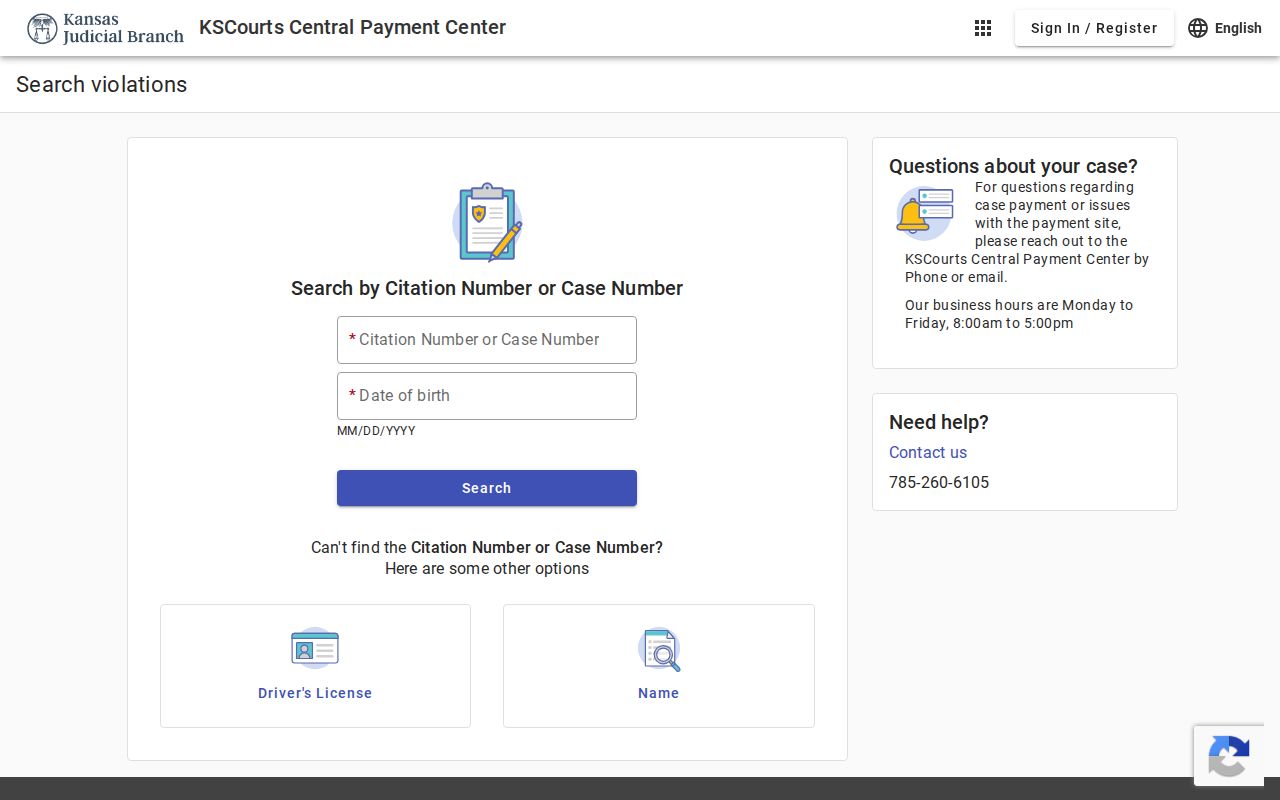
That page confirms the service is a payment and violation lookup. It is not a complete Wallace County traffic docket, and it does not provide certified records.
How to Find Your Traffic Court Date
Check the date at the bottom of the ticket first. If no scheduled fine appears there, call the court. The district tells you to do this before that date arrives. Nail down what the date means. Is it a payment deadline, a required appearance, or some other response point? If a setting gets reset later, check with the court, since dates can change.
| Citation or Case | Enter the printed identifier, such as WA-2026-TR-000001; this illustrates the county-prefixed case style, not a real case. |
|---|---|
| Court | Confirm District Court or the named municipal court. |
| Date and Time | Distinguish the ticket deadline from a scheduled hearing. |
| Location | Verify the address and room with the court. |
| Status | Read pending, paid, disposed, or other wording in context. |
For wider hearing information, compare the entry with Wallace County court dates. If the portal and the citation disagree, call the clerk.
Wallace County Traffic Citations Online
Rule 22 places certain traffic citations among the documents unavailable through the public portal. Case information can still appear. So a search may show an event or status while the citation image stays offline.
Two layers: A payment result is not a certified case record, and an online case entry does not guarantee that the citation document can be downloaded.
For a public item missing from remote access, try the courthouse terminal. If the document still is not there, ask the District Court clerk about a written copy request. Sealed or nonpublic material does not become public at the terminal.
Wallace County Ticket Payment Limits
A payment confirmation proves a transaction happened. It does not always prove the court's final case status. Keep the receipt. When a deadline is near or the citation lists another duty, check the issuing court's record. The district warns that you stay responsible for proving payment or compliance.
Assume nothing clears instantly. Ask the court whether the case is disposed and whether it can provide a compliance notice.
Pay or Contest a Ticket
The official process separates payment, contest, diversion, and appearance questions. Payment may run through the Central Payment Center. The instructions printed on the ticket also work. To contest, call the court in the county of issue by the ticket date. Diversion and plea negotiation questions go to the county attorney. The listed Wallace County Attorney number is 620-376-4325.
| Pay Route | Contest Route |
|---|---|
| Confirm the ticket is payable without an appearance. | Contact the issuing court by the printed date. |
| Use the official center or ticket instructions. | Ask how a plea and hearing will be set. |
| Keep proof and confirm the court status. | Direct diversion questions to the county attorney. |
Not every violation carries a scheduled fine. Court costs are separate. Per the district, scheduled fines double in construction and school zones, while the ticket's printed amount and deadline control.
Missed deadline: Failure to handle a ticket may lead to license suspension under K.S.A. 8-2110 and a stated $122 reinstatement fee in the described Kansas-driver situation.
Traffic Court Record vs Driving Record
Two different files follow a Wallace County traffic ticket. The court docket lives with the clerk, tracking each hearing and filing in the case. The driving record lives with the Kansas licensing agency, which logs points and license status. Paying through the court updates neither file in full.
| Court File | Driver File | |
|---|---|---|
| Custodian | Issuing court or District Court clerk | Kansas driver licensing agency |
| Shows | Citation case, settings, plea, and disposition | Official licensing status and reported actions |
| Access | Portal, terminal, or clerk request | State licensing record channel |
Call the court about the case and the state agency about your driving record. Neither system refreshes the other right away.
Wallace County Traffic Attorney Route
The county attorney plays one narrow part in Wallace County traffic matters. The district sends contest, diversion, and plea questions to that office. The court docket itself stays with the District Court. That office answers on records, appearance requirements, and hearing settings. When both issues arise, call both offices. For plea questions, use the Wallace County Attorney number the district publishes. For copies and court dates, use the District Court clerk. Keep the two straight. That keeps a records request away from an office that never held the docket.
Copies and Fees
Wallace County District Court applies the district records schedule to traffic copy fees. A municipal citation? Ask that court for its current charges. Confirm every amount before you order.
| Item | Fee | Note |
|---|---|---|
| Plain copy | $0.25 per page | District schedule |
| Certified document | $10.00 | Per certified document |
| $0.50 first five pages | $0.25 each next five | |
| Fax | $0.50 per page | Maximum 15 pages |
Requests needing staff research or review can cost more. Include the citation or case number, the exact document, your delivery choice, and whether you need certification. That detail separates a traffic case copy from a payment receipt or transcript.
Verify Wallace County Traffic Contacts
The district's own traffic, records, clerk, contact, ADA, and transcript pages all point to one number. They list 785-995-4289 for Wallace County District Court. Yet a jury page and a county FAQ show 785-852-4289. Conflicting numbers are exactly why you should confirm first. Check against a current court source before you drive over or call near a deadline. Mail goes to PO Box 8, and the courthouse sits at 313 Main Street. Ask staff whether the ticket has posted. Ask whether an appearance is required. Ask whether the court named on the ticket is the one answering. One clear question tied to the citation beats a broad traffic search every time.